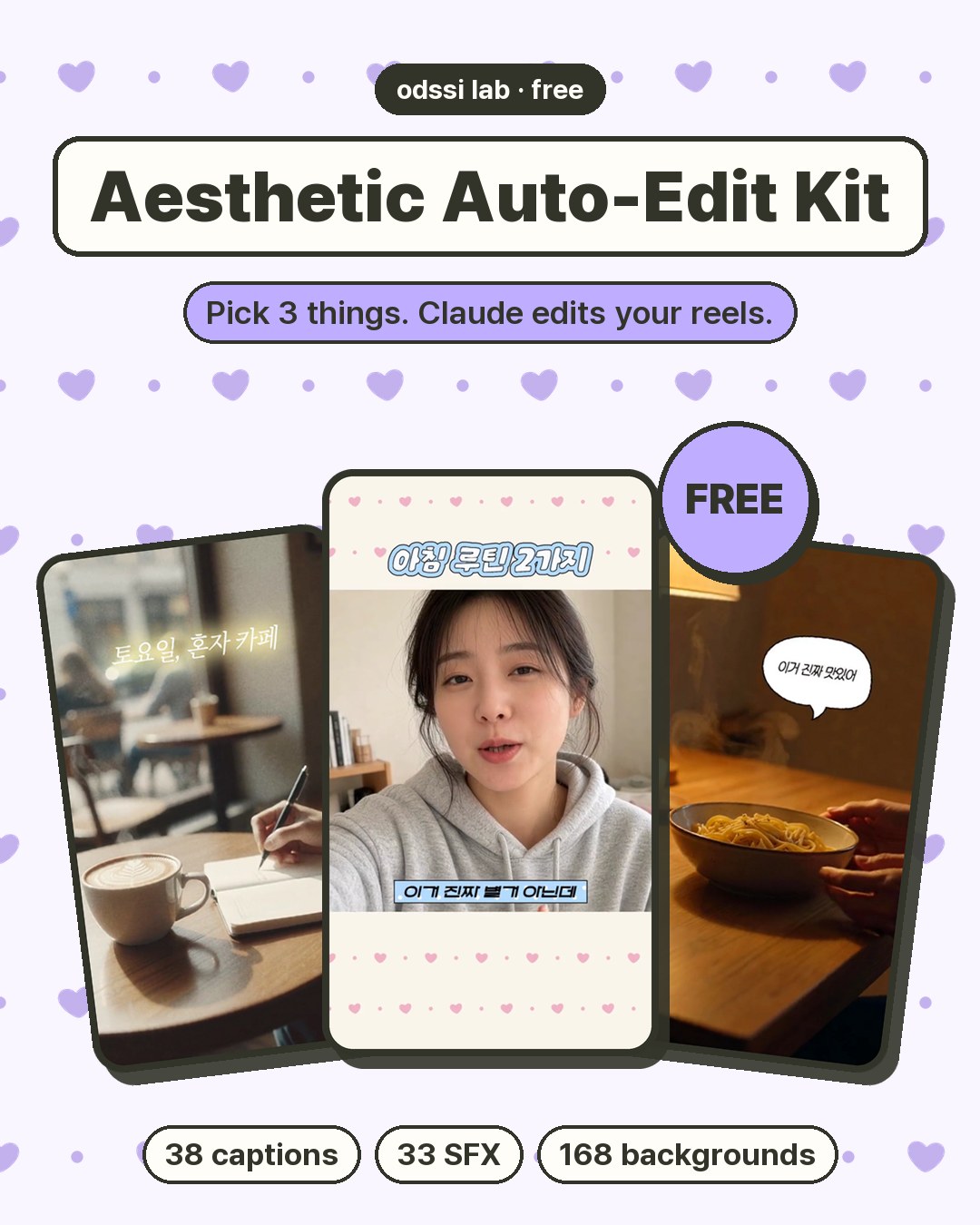
The people and scenes in the samples are AI-generated test footage. The videos are in Korean.
Digital kit · Claude Code
Aesthetic Auto-Edit Kit (Free)
No editing style yet? That's fine. Pick a layout, a design and colors, drop in your clips, and Claude makes the first cut of your reel with the captions, motion and sound effects I designed. Fix anything just by asking.
$0FREE
- Filezip, about 37 MB · v1.1
- You needClaude Code (desktop app, Pro or higher), Mac or Windows
- HowEnter your email and the download starts right away
- LanguageMade for Korean videos. The instructions are in Korean, but Claude will talk to you in English.
No payment. I only use your email to send you the kit and let you know about updates.
6 combinations
2 layouts × 3 designs = 6 combinations. You pick colors separately (each sample below uses different colors).
Made for you if
You haven't found your editing style
Pick one set, from caption design to sound effects. Your own taste builds up as you go.
You'd rather skip editing apps
No Premiere or CapCut. You get an mp4, and you ask Claude for changes in plain words.
Captions take you forever
Speech captions timed to your voice, hook titles, point captions and speech bubbles go in automatically.
You love pastel, sticker-style looks
The same tone I use in my own reels. Pick caption colors from 9 options or set your own.
What's inside
6
Style combinations
Layout (vertical · info) × design (cute · moody · minimal). The design sets captions, motion, SFX, color grade and transitions. Cut pace follows your footage.
38
Caption designs
17 speech · 11 titles & points · 4 mood · 6 speech bubbles. Boxes and bubbles resize to fit your text.
20
Caption motions
Bounce pop, stamp, word pop, typewriter… Claude picks what fits the moment. Speech captions stay clean with no motion.
33
Sound effects
Pop, whoosh, click, sparkle: neutral for information, cute only for funny moments. Levels are already balanced.
168
Pattern backgrounds
21 patterns (hearts, stars, flowers, ribbons, cats, stripes, gingham…) in 8 caption colors. They fill the bands of the info layout in the color you picked.
9
Caption colors
Coral, lavender, pink, lime, mint, sky blue, yellow, mono, or your own. Pick two to split them between speech and point captions.
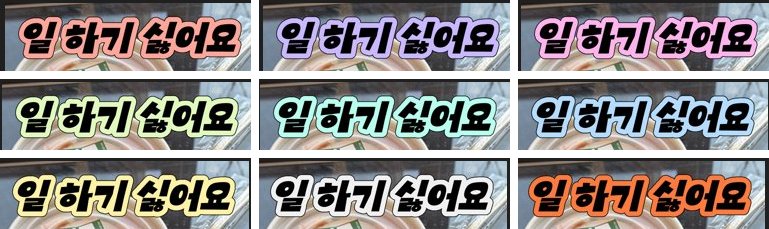
Same title caption, only the color changes. Coral · lavender · pink / lime · mint · sky blue / yellow · mono · your own color
No background music is included. Put your own track in the BGM folder and Claude places it and lowers it while you talk.
After you download
Unzip it Once
Unzip the file anywhere you like.Open the folder in Claude Code and paste the setup prompt Once
Claude installs what's needed (Node.js, ffmpeg, Python) and the caption fonts. It tells you the size first (about 4 GB for talking videos, about 1.3 GB for music-only videos).
📋 Setup prompt
Set up the kit. Check the programs listed in the instructions, and if anything needs installing, tell me the size first before you go ahead.
Pick a layout, design, colors and subtitles Once
Claude shows previews and a subtitle list, then asks multiple-choice questions: layout, design, colors (up to 2), subtitles and sound. You pick the caption, title and point styles, and Claude adds the rest. It remembers your picks.Drop clips into the source folder and start Every video
No need to rename files. Add a script if you have one.kit folder/ ├── 소스/ ← your clips and photos (source) ├── BGM/ ← (optional) your music └── 편집/ ← v1.mp4, v2.mp4 … results land here (edits)
📋 Edit prompt
I put my clips in the source folder. Make the first cut in the style I picked.
Watch and fix by asking Every video
Paste a screenshot and say what to change. You get v2, v3… until you're happy.
- "Seconds 3–5 drag. Cut that part in half."
- (screenshot) "This caption covers my face. Move it lower."
- "Add a point caption at 8s where I say 'ta-da'."
- "Change the caption color to mint."
- "The SFX drown out my voice. Lower them all by 3 dB."
Terms in short
⭕ You can
- Post videos you make with the kit anywhere (your account, client work, ads), including commercial use
- Change caption colors, position, size and motion, and the layout and design settings
❌ You can't
- Share or sell the kit files (caption designs, SFX, backgrounds, code, instructions)
- Put them in another template, asset pack or service
- Use them to train AI
The full terms are in 사용조건.md (terms of use, in Korean) inside the kit. Fonts are downloaded from their official sources, and each font's conditions are shown when it installs.
FAQ
Is it really free?
Yes. Claude Code does the editing on your own computer, so all you need is a Claude subscription (Pro or higher). Nothing else to pay.
Why do you ask for my email?
So I can tell people who downloaded the kit about updates (fixes, new versions). News about new kits only goes to people who tick that box. Ask me and I'll delete your email right away.
Can I download it again later?
Yes. Use the same email on this page as many times as you like.
Does it work for English videos?
The kit is made and tested for Korean videos: the instructions are in Korean and speech timing is tuned for Korean. Claude will talk to you in English, and the caption designs show English text, but I haven't tested English videos fully yet.
Does it work on Windows?
Yes. Claude asks about your system and installs what's needed for Mac or Windows.
Can I use the videos for ads or client work?
Yes. You just can't share or sell the kit files themselves. Remotion, which does the rendering, is free for individuals, companies with 3 or fewer employees and non-profits. Bigger companies need a Remotion company license.
Are the fonts OK for commercial use?
I only picked free fonts that allow commercial use in videos. Fonts with conditions show them and ask for your OK when they install. Two fonts can't be downloaded automatically; put them in yourself to use the originals, or the kit uses similar free fonts.
What about sound effect copyright?
All 33 sound effects are AI-generated with Stable Audio Open. Use them freely in videos you make with the kit; just don't share the sound files on their own.
Will there be more designs?
I plan to make more depending on how people like it. Tick "Send me news about new kits" when you download and I'll let you know.
Aesthetic Auto-Edit Kit (Free)
Just enter your email to download · zip, about 37 MB